Chrome extension
Every opportunity, one click from done.
Your Revtive briefing lives in Chrome's side panel. Open the thread with your reply already written, mark it done, and get back to work without opening the dashboard.
- Free on every plan, including the free plan.
- Chrome 116 or newer
- Version 1.0.0
How it works
Set up in about a minute
Add it to Chrome
Install it from the Chrome Web Store and pin it to your toolbar.
Connect your account
Press Connect and approve it on revtive.com. You never type your password into the extension.
Work from the side panel
Open it from the toolbar or with Alt+Shift+R. Your opportunities are already there.
What it does
The whole job, from the side panel
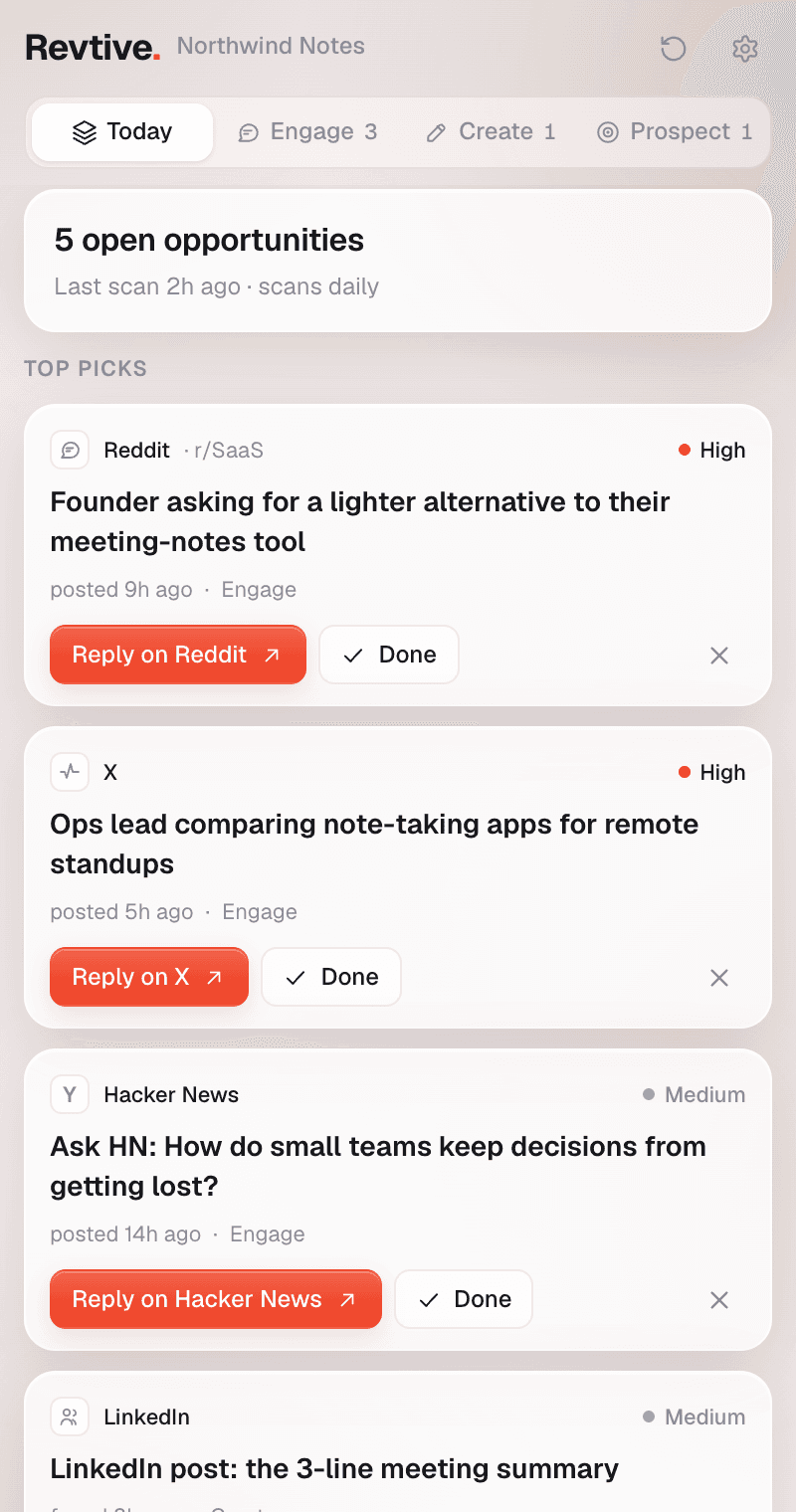
Today's briefing in the side panel
What your agents found since you last looked, ranked by impact, next to whatever you're reading. The toolbar badge counts what's new.
One click to the thread
Every card has the button that does its job. Reply on X opens with your reply written, a Reddit post opens with the form filled in, and everything else opens the thread with your draft on the clipboard.
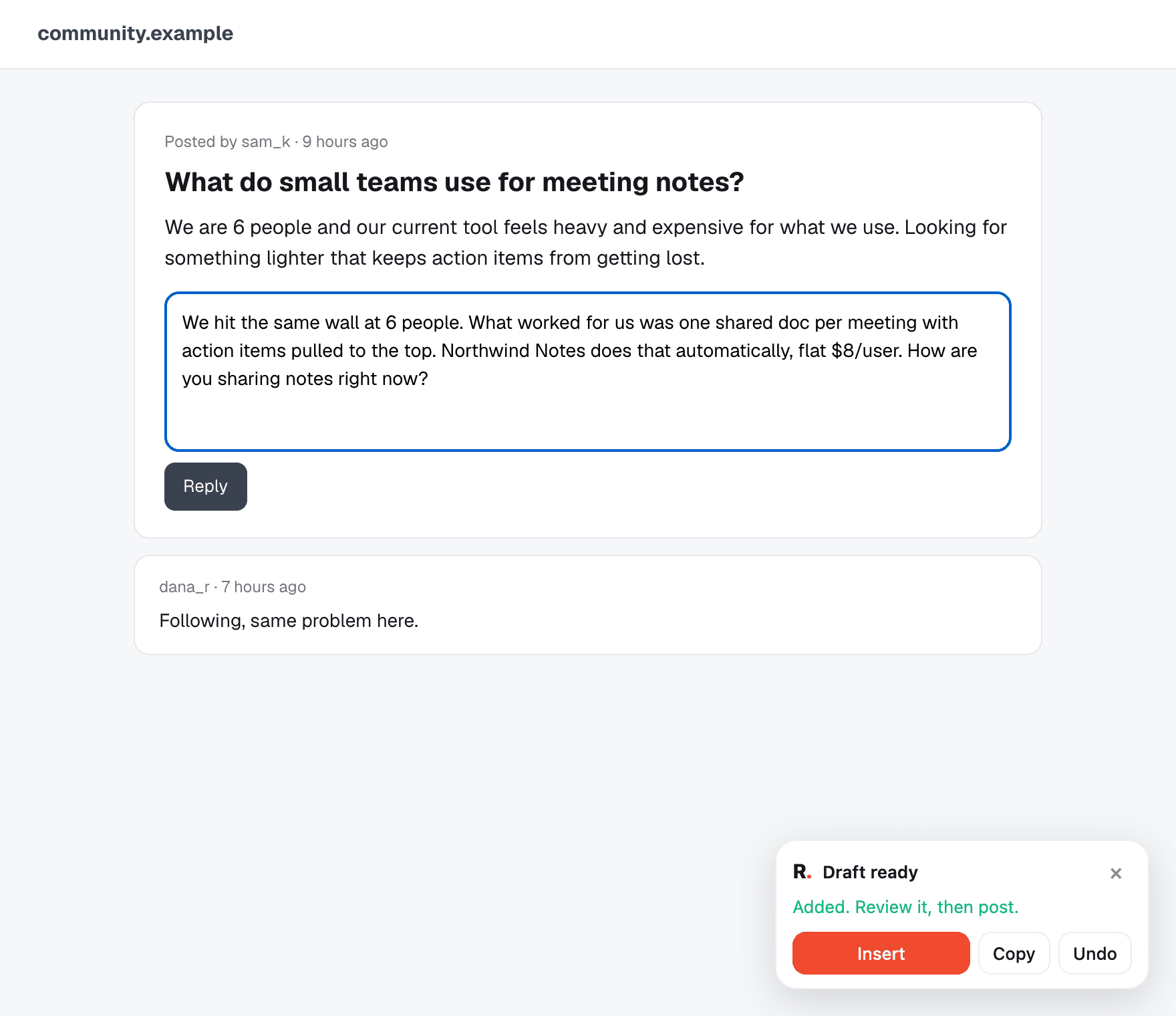
Your draft, typed into the reply box
Allow Reddit, LinkedIn or Hacker News once, and a small card on the thread puts your draft into the reply box. You read it, change what you like, and press Post yourself.
Done and dismiss, with a reason
Mark a card done when you've acted on it, or dismiss it with one tap on a reason. Your agents read both, and Undo is always one click away.
Email from your own mailbox
Prospect emails open in the panel with the draft filled in. Add the address, edit what you like, and send it from the mailbox you connected. Leftover placeholders like [Name] are flagged before you send.
A morning heads-up, if you want one
One notification a day, at the hour you pick, when there's something new. It stays off until you switch it on.
Where it works
Your draft, waiting in the box
- X
- Replies and posts open with your text already written.
- Redditasks once
- New posts open with the title and body filled in. For a reply, a card on the thread puts your draft into the comment box.
- LinkedInasks once
- Opens the post or the composer and puts your draft in.
- Hacker Newsasks once
- Opens the thread and puts your reply into the comment box.
- Forums and everything else
- Opens the thread with your draft on the clipboard, ready to paste.
Privacy
It asks for as little as it can
What it never does
- Post, comment or send anything on its own. You press every button that publishes.
- Read the pages you browse or keep any browsing history.
- Run on a site you haven't allowed. Site access is optional and asked for one site at a time.
- Talk to any server but revtive.com.
How it keeps your account safe
- It signs in with a key of its own, never your password. Disconnect it from the extension or from Settings and it stops working at once.
- Changing or resetting your password disconnects every browser.
- It shows exactly what your plan shows in the dashboard, and nothing more.
Every permission, and why
4 at install, 4 asked for only when you use them.
- Side panelat installShows the panel.
- Storageat installKeeps your connection key and settings on this computer.
- Background timerat installRefreshes the toolbar badge and times the morning note.
- Typing into a pageat installTypes your draft into the reply box of a tab the panel opened. It can't do anything without one of the site permissions below.
- NotificationsoptionalThe morning note. Asked for only when you turn it on.
- reddit.comoptionalTypes drafts into Reddit reply boxes. Asked for the first time you reply there.
- linkedin.comoptionalTypes drafts into LinkedIn's comment and post boxes. Asked for the first time you reply there.
- news.ycombinator.comoptionalTypes drafts into Hacker News comment boxes. Asked for the first time you reply there.
The details are in our privacy policy.
Questions
All of them, including the free plan. It shows the same opportunities your plan shows in the dashboard. Sending email from the panel needs Growth, same as in the app.
No. It opens the page and, where you've allowed it, types your draft into the box. You read it and press Post. There's no way for it to publish anything on its own.
Your Revtive opportunities, and nothing about the pages you visit. On Reddit, LinkedIn and Hacker News, if you allow them, it only touches the tab it opened for you, and only to type in your draft.
Google Chrome 116 or newer. Other Chromium browsers can install it from the Chrome Web Store, but the panel needs the browser to support Chrome's side panel.
Open the panel's settings and press Disconnect, or remove it under Settings, Integrations in Revtive. Either one cuts it off straight away. Uninstalling it deletes everything it kept on your computer.
Act on it from any tab
Free on every plan, including the free plan.